Reading a mesh file
Lizzy can read a mesh file that contains tagged domains and boundaries.
Important
Currently, the only supported mesh format is .msh (Version 4 ASCII). This is a typical mesh format that can be exported using software like GMSH. Continuing development, more formats will gradually be supported.
Mesh preparation (GMSH version)
The GMSH .msh file has some requirements to be compatible with Lizzy:
The mesh must be composed uniquely of 2D triangle elements (quads or 3D elements are not supported yet).
Physical groups must be defined for all material domains and for all edges where a boundary condition will be applied. The name of the physical groups will be used to identify the different boundaries and materials in the mesh.
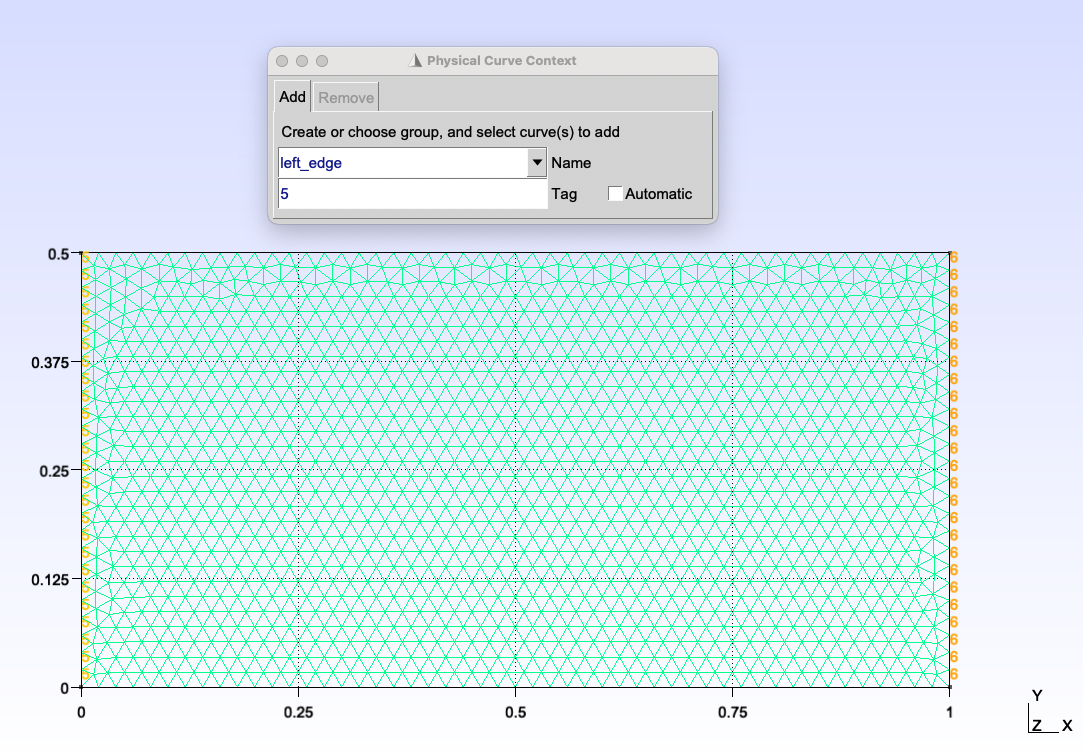
An example of a GMSH mesh, where a physical boundary is being defined.
As an example, we provide a GMSH script (.geo) that demonstrated how to create a simple rectangular mesh with physical groups for Lizzy.
The file can be opened in GMSH and exported as a .msh file.
To learn more about how to prepare mesh files and tag physical entities using GMSH, refer to the GMSH documentation .
Reading the mesh in Lizzy
Reading an existing mesh file is typically the first operation that we perform after instantiating a LizzyModel object. To read a mesh, we call the read_mesh_file() method:
model.read_mesh_file("PATH_TO_FILE")
After reading the mesh, we can use the print_mesh_info() method to verify that the mesh has been read correctly, and that all physical groups are present:
>>> model.print_mesh_info()
>>>
    Mesh file format: MSH (v4 ASCII),
    Case name:    CHANNEL_INFUSION,
    Mesh contains 1500 nodes, 3000 elements.
    Physical domains:        ['domain_1', 'domain_2']
    Physical lines:          ['left_edge', 'right_edge', 'walls']