Boundary conditions operations
In this section we look at various boundary condition operations, including creating boundary conditions and modifying them at runtime.
All operations can be performed using the LizzyModel user-facing methods.
Creation and assignment of inlets
Note
The following operations are to be performed before the solver is initialised by calling initialise_solver().
Lizzy supports two types of inlets:
Pressure inlet (
PressureInlet): prescribes a fixed pressure (Dirichlet BC) at the boundary. This is the most common inlet type.Flow rate inlet (
FlowRateInlet): prescribes a fixed volumetric flow rate (Neumann BC) at the boundary. This is an experimental feature.
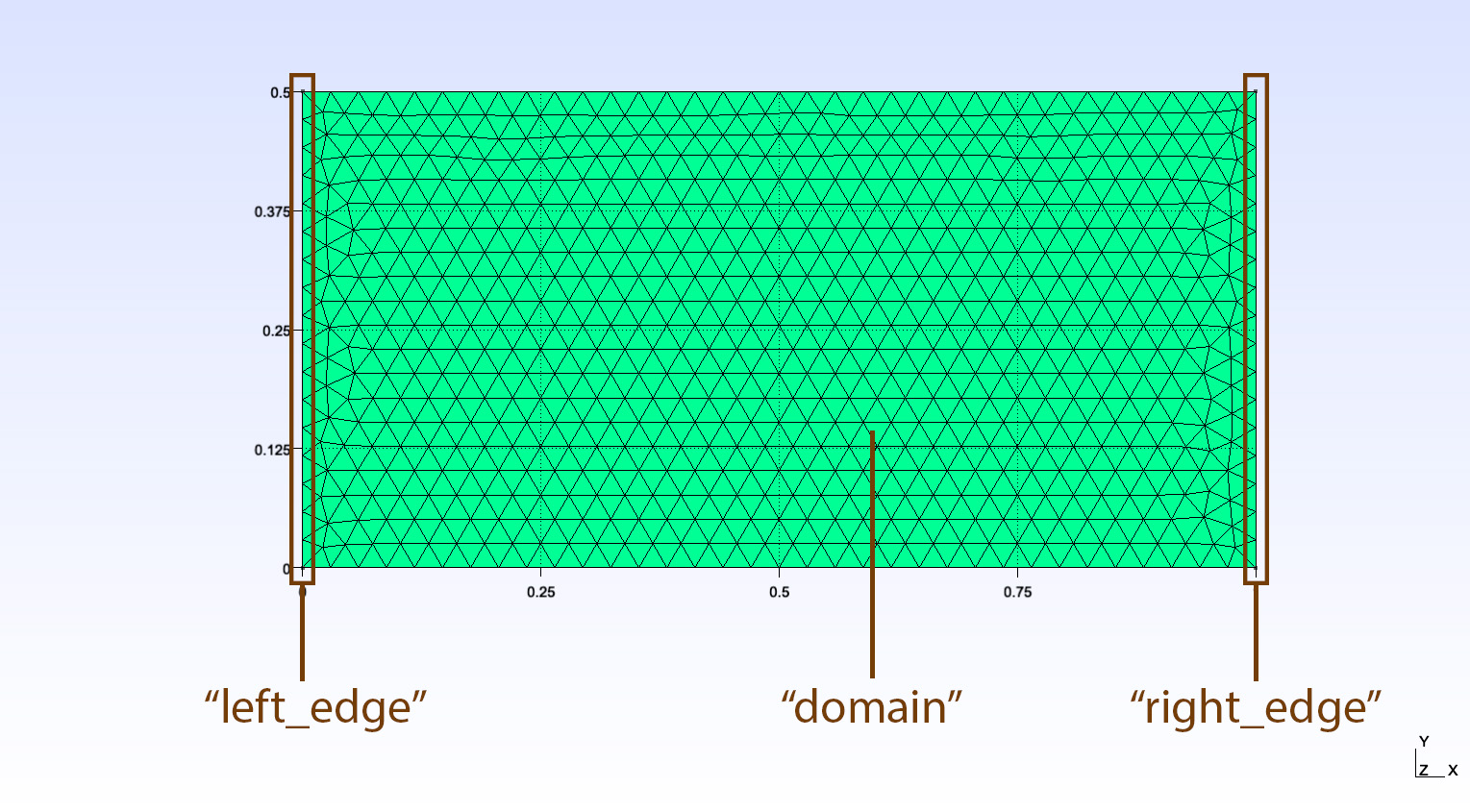
Let’s say we have imported a mesh with one boundary named “left_edge” and one boundary named “right_edge”:
>>> model.print_mesh_info()
>>>
    Mesh file format: MSH (v4 ASCII),
    Case name:    EXAMPLE_EDGES,
    Mesh contains 1500 nodes, 3000 elements.
    Physical domains:        ['domain']
    Physical lines:          ['left_edge', 'right_edge']
Pressure inlet
To create a pressure inlet, use the create_pressure_inlet() method, providing a unique name and the prescribed pressure [Pa]:
model.create_pressure_inlet("inlet_1", 1e5)
A PressureInlet object is created and stored in the model, but not yet assigned to any boundary. To assign it, use the assign_inlet() method:
model.assign_inlet("inlet_1", "left_edge")
Flow rate inlet
To create a flow rate inlet, use the create_flowrate_inlet() method, providing a unique name and the prescribed volumetric flow rate [m³/s]:
model.create_flowrate_inlet("inlet_1", 1e-6)
Assign it to a boundary with the same assign_inlet() method:
model.assign_inlet("inlet_1", "left_edge")
Tip
An alternative way to assign inlets is to pass the inlet object directly by reference instead of its name. When creating an inlet, the object is returned and can be stored in a variable:
new_inlet = model.create_pressure_inlet("inlet_1", 1e5)
model.assign_inlet(new_inlet, "left_edge")
Once an inlet is assigned, it is set to “open” state by default. We can check its state at any time using the is_open property (read-only).
>>> new_inlet = model.create_pressure_inlet("inlet_1", 1e5)
>>> model.assign_inlet(new_inlet, "left_edge")
>>> new_inlet.is_open

    True
Fetching inlets from the model
To fetch an existing inlet from the model using its unique tag, we can use the fetch_inlet_by_name() method. This method requires the inlet name. For example, to fetch the inlet tagged as “inlet_1”, we would do:
inlet = model.fetch_inlet_by_name("inlet_1")
This expression returns the Inlet object with that name. We can then use this object to access its properties and methods.
Note
This method works even at runtime, i.e., after the solver has been initialised by calling initialise_solver().
Creation and assignment of vents
Note
The following operations are to be performed before the solver is initialised by calling initialise_solver().
A vent is an outlet boundary condition that prescribes a fixed vacuum pressure (typically 0 Pa) at a mesh boundary. It represents the exit point through which air is evacuated during resin infusion.
To create a vent, use the create_vent() method, providing a unique name and an optional vacuum pressure value [Pa] (default is 0.0):
model.create_vent("vent_1")
To assign the vent to a mesh boundary, use the assign_vent() method:
model.assign_vent("vent_1", "right_edge")
Note
Currently only one vent can be assigned to the model. Attempting to assign a second vent will raise a ConfigurationError.
Note
Lizzy does not currently simulate the formation of dry spots. The vent vacuum pressure is applied as a boundary condition to all unfilled control volumes in the domain at every time step, not exclusively at the designated vent boundary. This is a simplification of the physical problem and means that the vent location does not affect the pressure field in the unfilled region.
If no vent is assigned, a default vacuum pressure of 0.0 Pa is applied to all unfilled control volumes.
Runtime operations
Note
The following operations can be performed at any time after the solver has been initialised by calling initialise_solver().
Opening / closing inlets
To open or close an existing inlet during the simulation, we can use the open_inlet() and close_inlet() methods, respectively. Both methods require a single argument: the inlet tag. For example, to close the inlet tagged as “inlet_1”, we would do:
model.close_inlet("inlet_1")
This expression turns the inlet boundary into a wall boundary (Neumann natural boundary condition). To open the inlet at any time, we would do:
model.open_inlet("inlet_1")
This expression restores the inlet boundary condition with the last assigned pressure value.
Alternatively, we can also modify the inlet state from the Inlet object itself using the set_open() method:
inlet = model.fetch_inlet_by_name("inlet_1")
inlet.set_open(False)  # closes the inlet
inlet.set_open(True)   # opens the inlet
This will produce the same effect as using the open_inlet()/ close_inlet() model methods.
Tip
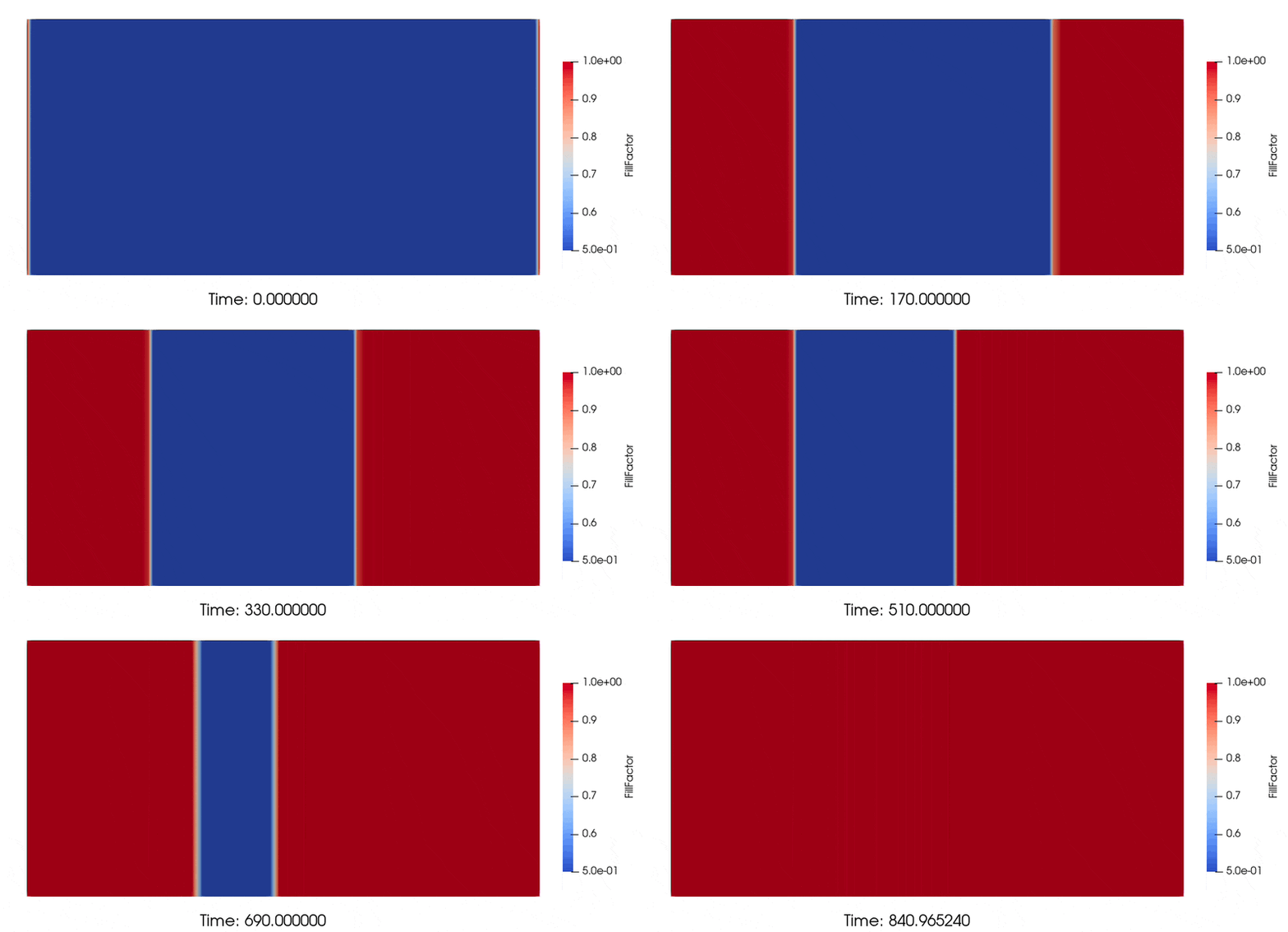
The open_inlet() and close_inlet() functions work well with the solve_time_interval() method. For example, we can advance the simulation by a given amount of time, then close an inlet, and resume the filling:
# advance simulation by 150 seconds
sol = model.solve_time_interval(150)

# close the inlet
model.close_inlet("inlet_left")

# advance simulation by another 400 seconds
sol = model.solve_time_interval(400)

# reopen the inlet
model.open_inlet("inlet_left")

# advance simulation till part fill
sol = model.solve()
Warning
Do not close all the inlets in the model at the same time! At least one inlet should always be open to compute the next time step. Closing all inlets will lead to an error:
>>> ConfigurationError: No inlets are currently open. At least one inlet must be open at all times.
Modifying inlet pressure
To modify the pressure of an existing inlet during the simulation, we can use the change_inlet_pressure() method. This method requires two arguments: the inlet tag and the new pressure value. For example, to change the pressure of the inlet tagged as “inlet_1” to 2.0E05 Pa, we would do:
model.change_inlet_pressure("inlet_1", 2e5)
This method can be called at any time during the simulation. The new value will be applied at the next time step in the simulation, allowing for dynamic boundary conditions. We can also specify whether the new pressure value should be applied as a new absolute value or as a relative change to the current pressure by using the optional third argument mode which can be set (default) or delta.
mode = “set”: sets the inlet pressure to the new value provided.
mode = “delta”: increases the current inlet pressure by the new value provided.
For example, to increase the pressure of “inlet_1” by 5.0E04 Pa, we would do:
model.change_inlet_pressure("inlet_1", 5e4, "delta")
Tip
The change_inlet_pressure() function works well with the solve_time_interval() method. For example, we can advance the simulation by a given amount of time, then modify the inlet pressure, and resume the filling:
# Simulation begins wih one inlet set to 1E05 Pa. Fill for 300 seconds:
sol = model.solve_time_interval(300)

# Then we decrease inlet pressure by 60000 Pa (mode = "delta")
model.change_inlet_pressure("inlet_tag", -60000, "delta")

# Advance simulation by another 800 seconds
sol = model.solve_time_interval(800)

# Then we set inlet pressure to 3E05 Pa (we omit mode, so default mode = "set" is used)
model.change_inlet_pressure("inlet_tag", 3e05)

# Advance simulation till part fill
sol = model.solve()
