Racetracking
This tutorial demonstrates how to set up a simulation with multiple material domains. We will simulate the filling of a rectangular panel that has a side racetrack: a thin, highly-permeable channel running along one edge of the part. Racetracks can occur when the laminate is laid up in the mold and can disrupt the flow front.
All files used in this tutorial are available in the tutorials/racetracking folder. We recommend you download the mesh alone and create the script yourself following the tutorial.
Note
If you have not yet completed the Channel Flow tutorial, we advise to do that first because here we will not cover in detail the steps that were already introduced.
The mesh
The mesh represents a 1 m × 0.3 m rectangle. A thin strip of 2 mm height runs along the top edge, representing the racetrack gap. The mesh contains 4 domain tags:
left_edge: line tag assigned to the left edge of both the domain and the racetrack
right_edge: line tag assigned to the right edge of both the domain and the racetrack
domain: elements tag assigned to the main laminate region
racetrack: elements tag assigned to the thin top strip
Preparing the working folder
Follow the same steps described in Channel Flow to set up the working folder and copy the mesh file into it. Create a new Python script — in this example we name it racetrack.py.
Setting up the model
This section is largely identical to the Channel Flow example, so see that for details. Let’s import Lizzy and configure logging:
import lizzy

import logging
logging.basicConfig(level=logging.INFO)
Let’s create the LizzyModel, read the mesh file and set some parameters:
model = lizzy.LizzyModel()
model.read_mesh_file("ChannelRacetrack.msh")
model.set_simulation_parameters(output_interval=5, progress_bar=True)
Note that we set the output interval to 5 seconds (more frequent solutions write out) because the flow front will move very quickly through the racetrack.
Now let’s define a resin with viscosity 0.1 Pa s:
model.create_resin("resin_01", 0.1)
model.assign_resin("resin_01")
Creating materials
This is where the setup differs from the Channel Flow case. Because the mesh has two surface tags, we need to assign a material to each of them.
First, let’s create and assign the laminate material. We will stick to the same used in the Channel Flow case:
model.create_material("domain_material", (1E-10, 1E-10, 1E-10), 0.5, 0.005)
model.assign_material("domain_material", "domain")
Now we can define the racetrack material. A racetrack not a porous material, so does it not have a proper permeability. However, we can resort to lubrication approximation theory to calculate the equivalent permeability when in presence of a thin film of fluid between two parallel plates. The equivalent permeability for laminar flow in such a geometry is k = H**2 / 12, where H is the gap height. Since the gap is fully open and contains no fibres, its porosity is 1.0. Let’s compute the permeability and create the material:
racetrack_gap = 0.002  # from the mesh construction
racetrack_perm = racetrack_gap**2 / 12

model.create_material("racetrack_material", (racetrack_perm, racetrack_perm, racetrack_perm), 1.0, 0.005)
model.assign_material("racetrack_material", "racetrack")
Important
Each material tag present in the mesh must be assigned a material, otherwise initialisation will raise an error.
Boundary conditions
The boundary conditions are the same as in the Channel Flow case, and the mesh uses the same tags:
model.create_pressure_inlet("inlet_left", 100000)
model.assign_inlet("inlet_left", "left_edge")

model.create_vent("vent_right", 0.0)
model.assign_vent("vent_right", "right_edge")
Initialise, solve and save results
The following steps are identical to the Channel Flow case:
model.initialise_solver()
model.solve()
model.save_results()
The full script
import lizzy

import logging
logging.basicConfig(level=logging.INFO)

racetrack_gap = 0.002
racetrack_perm = racetrack_gap**2 / 12

model = lizzy.LizzyModel()
model.read_mesh_file("ChannelRacetrack.msh")
model.set_simulation_parameters(output_interval=5, progress_bar=True)

model.create_resin("resin_01", 0.1)
model.assign_resin("resin_01")

model.create_material("domain_material", (1E-10, 1E-10, 1E-10), 0.5, 0.005)
model.assign_material("domain_material", "domain")

model.create_material("racetrack_material", (racetrack_perm, racetrack_perm, racetrack_perm), 1.0, 0.005)
model.assign_material("racetrack_material", "racetrack")

model.create_pressure_inlet("inlet_left", 100000)
model.assign_inlet("inlet_left", "left_edge")

model.create_vent("vent_right", 0.0)
model.assign_vent("vent_right", "right_edge")

model.initialise_solver()
model.solve()

model.save_results()
Solution visualisation
Load the file ChannelRacetrack_RES.xdmf into Paraview to visualise the results. When prompted, make sure to select `Xdmf3 Reader S` to avoid formatting issues.
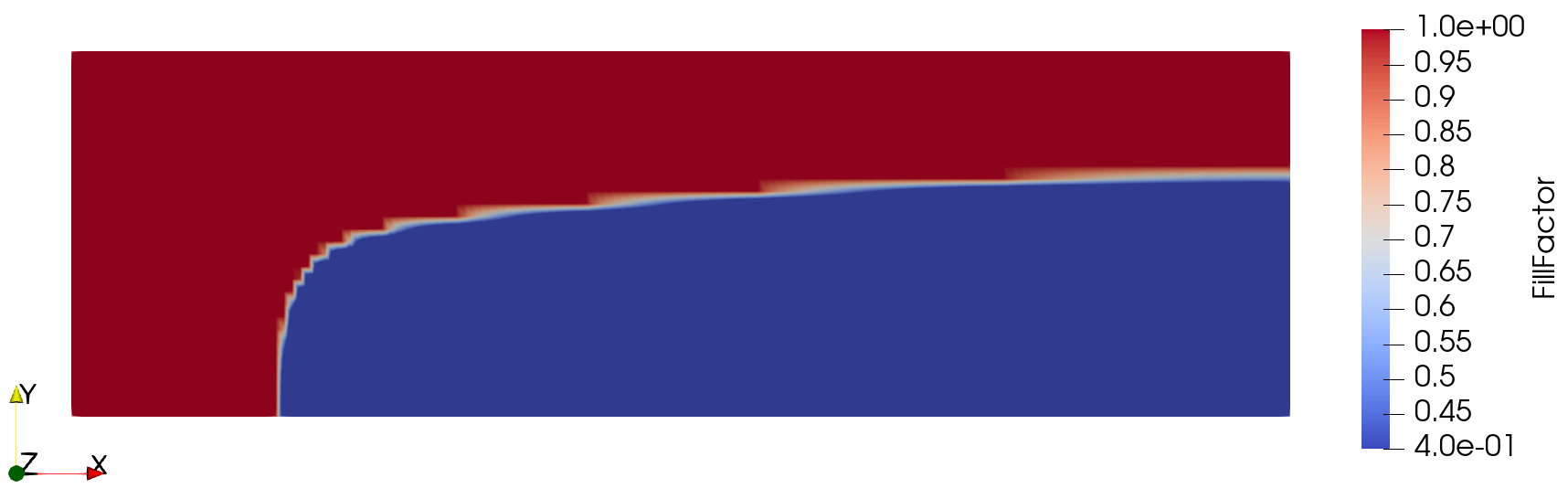
Because the racetrack permeability is several orders of magnitude higher than the bulk laminate, the fluid reaches the right edge quickly along the top strip and then propagates downward into the part. This produces the characteristic L-shaped flow front that we observe.